


 June 3, 2026 3:42 am
How to Change New Passport Number in Qatar ID (QID)? Updating your passport number on your Qatar ID (QID) is essential when you renew your passport or receive a replacement due to loss or damage.
The Ministry of Interior (MOI) has streamlined this process through digital platforms, making it convenient for residents to update their information without visiting service centers.
This comprehensive guide covers everything you need to know about changing your passport number in Qatar ID using the Metrash app, MOI portal, or in-person services.
Why You Need to Update Your Passport Number in QID?
Your Qatar ID is directly linked to your passport, serving as your primary identification for residency, banking, healthcare, and travel within Qatar. When your passport number changes, updating your QID ensures:
- Uninterrupted access to government and private services
- Smooth immigration processing at e-gates and airports
- Accurate residency records with the Ministry of Interior
- Compliance with Qatar’s legal residency requirements
According to the Ministry of Interior, residents should update their passport information promptly when changes occur to prevent delays and facilitate faster processing of transactions.
Method 1: Change Passport Number via Metrash App
The Metrash mobile application is the most convenient way to update your passport details. The MOI has enhanced the app with user-friendly features specifically for this purpose:
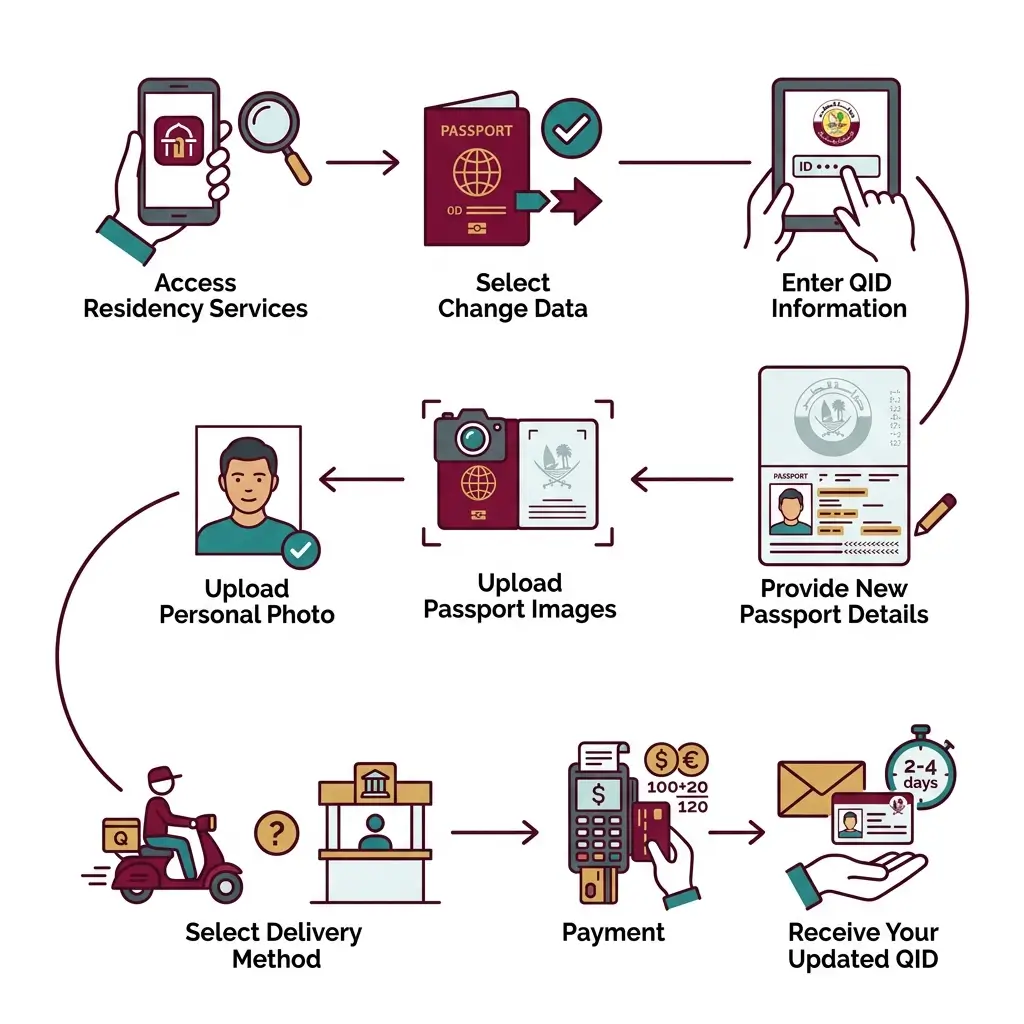
Step 1: Access Residency Services
Open the Metrash app and log in using your credentials. From the home screen, tap on “Residency”.
Step 2: Select Change Data
Navigate to “Change Data” and then select “Change Passport” or “Change Passport Details“.
Step 3: Enter QID Information
Input your Qatar ID number and click “Next” to proceed.
Step 4: Provide New Passport Details
Enter the following information from your new passport:
- Passport number
- Issue date
- Expiry date
- Nationality
- Place of issue
Step 5: Upload Passport Images
Scan or upload clear images of:
- The main page (bio-data page) of your new passport
- The second page containing additional details
Ensure the image is properly lit, free of reflections, and that all passport data fits within the designated box .
Step 6: Upload Personal Photo
Provide a clear, recent personal photograph with a white background
Step 7: Select Delivery Method
Choose between:
- Q-Post delivery to your registered address (additional QR 20)
- Pickup at the nearest MOI Service Center
Step 8: Payment
Pay the service fee of QR 100 using your debit or credit card. If you selected Q-Post delivery, the total will be QR 120 (QR 100 + QR 20)
Step 9: Receive Your Updated QID
A Q-Post representative will contact you to arrange delivery of your new Qatar ID, typically within 2-4 working days.
Method 2: Update Passport Number via MOI Online Portal
For those who prefer using a desktop computer, the Ministry of Interior e-services portal offers a comprehensive solution:
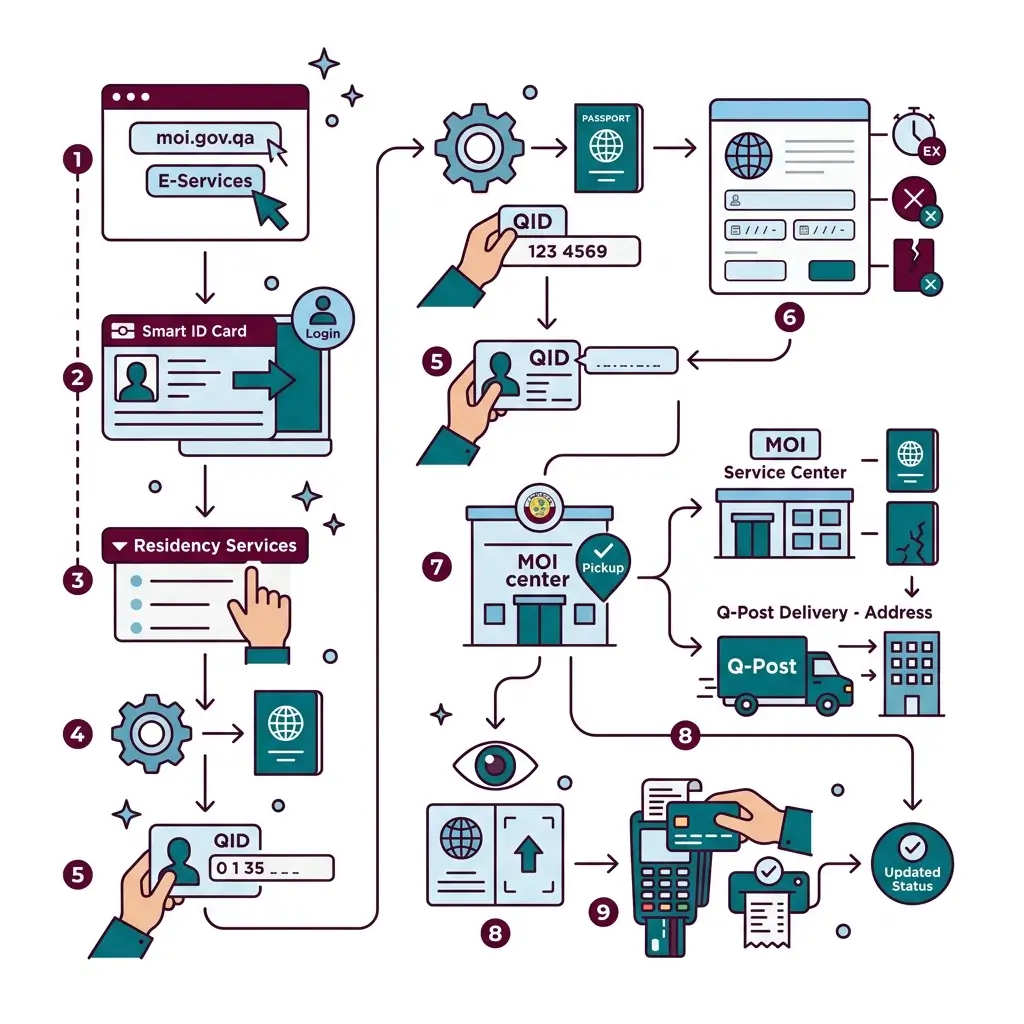
Step 1: Access the MOI Portal
Visit the official MOI website (https://portal.moi.gov.qa/wps/portal/MOIInternet/home) and navigate to E-Services
Step 2: Login
Log in using your Smart ID card or registered credentials
Step 3: Navigate to Residency Services
Select “Residency Services” from the menu options
Step 4: Select Change Residency to New Passport
Click on “Change Residency to New Passport” to begin the update process
Step 5: Enter QID Number
Input your Qatar ID number in the designated field.
Step 6: Provide New Passport Information
Fill in all necessary details including passport number, issue date, expiry date, and place of issue. Select the reason for updating (expiration, loss, or damage).
Step 7: Choose Delivery Method
Enter your mobile number and select your preferred delivery option:
- Collection from MOI service center
- Home delivery via Q-Post (QR 20 additional)
Provide your complete address details including area, street number, and building number.
Step 8: Upload Documents
Attach clear digital scans of the first and second pages of your new passport.
Step 9: Payment and Confirmation
Complete the payment using your card and save or print the receipt for your records.
Method 3: In-Person Update at MOI Service Center
For immediate processing or if you encounter issues with digital methods, visiting an MOI Service Center is the best option.
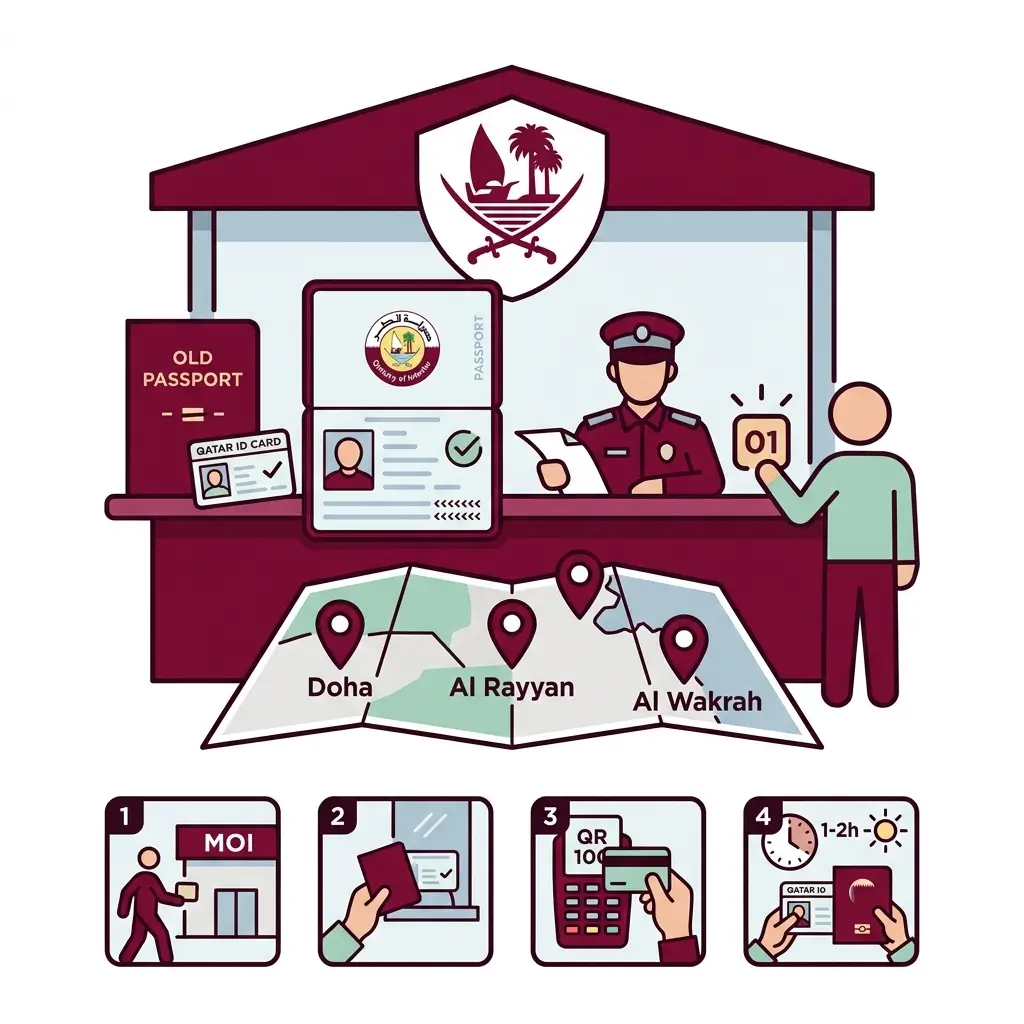
What to Bring
- Original Qatar ID (QID)
- Original new passport
- Copy of new passport’s bio-data pages
- Old passport (if available)
Process
- Visit the nearest MOI Service Center (operating hours: Sunday-Thursday, 7:00 AM to 1:00 PM)
- Obtain a service token from reception specifying “update passport details”
- Submit documents when called
- Pay QR 100 fee at the counter
- Receive your updated QID the same day (usually within 1-2 hours)
Key MOI Service Center Locations
| Location | Address | Contact |
|---|---|---|
| Doha | Al Matar St., Doha | +974 30307245 |
| Al Rayyan | Umm Salal Mohammed St., Al Rayyan | +974 2350333 |
| Al Wakrah | Al Wukair St., Al Wakrah | +974 44640699 |
Important Information and Troubleshooting
Who Can Use This Service?
The Metrash passport update service is available to:
- Individual sponsors updating their own QID
- Sponsors updating details for their family members or employees
If you encounter the error message “Kindly check with the Immigration Department”, it typically indicates that you are not the sponsor (for example, if you are under company sponsorship). In such cases, your PRO (Public Relations Officer) or sponsor must handle the update on your behalf
Processing Times
| Method | Processing Time |
|---|---|
| Metrash App | 2-4 working days |
| MOI Portal | 2-4 working days |
| In-Person at Service Center | Same day (1-2 hours) |
Fees Summary
| Service | Fee |
|---|---|
| Passport Number Update | QR 100 |
| Q-Post Delivery (Optional) | QR 20 |
Required Documents Checklist
Before starting your application, ensure you have:Table
| Document | Purpose |
|---|---|
| Valid Qatar ID (QID) | Identity verification |
| New Passport | Updated passport information |
| Old Passport (if available) | Reference for previous records |
| Passport Photos | Clear images of bio-data pages |
| Personal Photograph | Recent photo with white background |
| Proof of Income | For certain categories (if applicable) |
Tips for a Smooth Update Process
- Update Promptly: Change your QID details as soon as you receive your new passport to avoid delays at e-gates or during transactions .
- Quality Document Scans: Ensure uploaded passport images are bright, fully visible, and free of reflections or glare .
- Carry Both Passports: Until your updated QID is issued, travel with both your old and new passports along with your current QID .
- Check Status Online: Track your application status through the MOI portal or Metrash app using your QID number .
- Contact Helpline: For assistance, contact the MOI helpline or visit their official social media channels .
FAQs About How to Change New Passport Number in Qatar ID (QID)?
Q: Can I travel while my passport number update is pending?
Yes, you can travel using your new passport along with the valid visa in your old passport. Carry both passports until your QID is updated.
Q: What if my visa is on my old passport?
You can still use that visa for travel by presenting both passports at immigration. The valid visa in your old passport remains acceptable .
Q: Is the Metrash service available 24/7?
Yes, the digital application can be submitted anytime, but processing occurs during business days.
Q: Can I update my passport number from outside Qatar?
Yes, you can use the Metrash app or MOI portal from abroad, or seek assistance from the nearest Qatari embassy.
Q: What happens if my application is rejected?
Check the specific reason provided in the app or portal. Common issues include unclear document images or mismatched information. You can reapply or visit an MOI center for assistance.
Conclusion
Updating your passport number in your Qatar ID is a straightforward process thanks to the Ministry of Interior’s digital services. Whether you choose the convenience of the Metrash app, the comprehensive MOI portal, or immediate in-person service, ensuring your QID reflects your current passport information is essential for seamless residency management in Qatar.
With a standard fee of QR 100 and processing times as fast as same-day for in-person applications, there’s no reason to delay this important update. Keep your documents ready, follow the steps outlined in this guide, and maintain your compliance with Qatar’s residency requirements effortlessly.
Sheikh Khalifa bin Hamad
I am Sheikh Khalifa bin Hamad, the writer behind https://qataridcheck.com/. I share simple guides about Qatar ID services, residency updates, and government procedures. My goal is to help residents easily check QID status, renewals, fines, and official information online.
